Use code

for 30% off your first plan.

← Back to Nano Banana prompts

Nano Banana prompt

Casual Classic Nano Banana Prompt

Published July 14, 2026 · ♥ 92

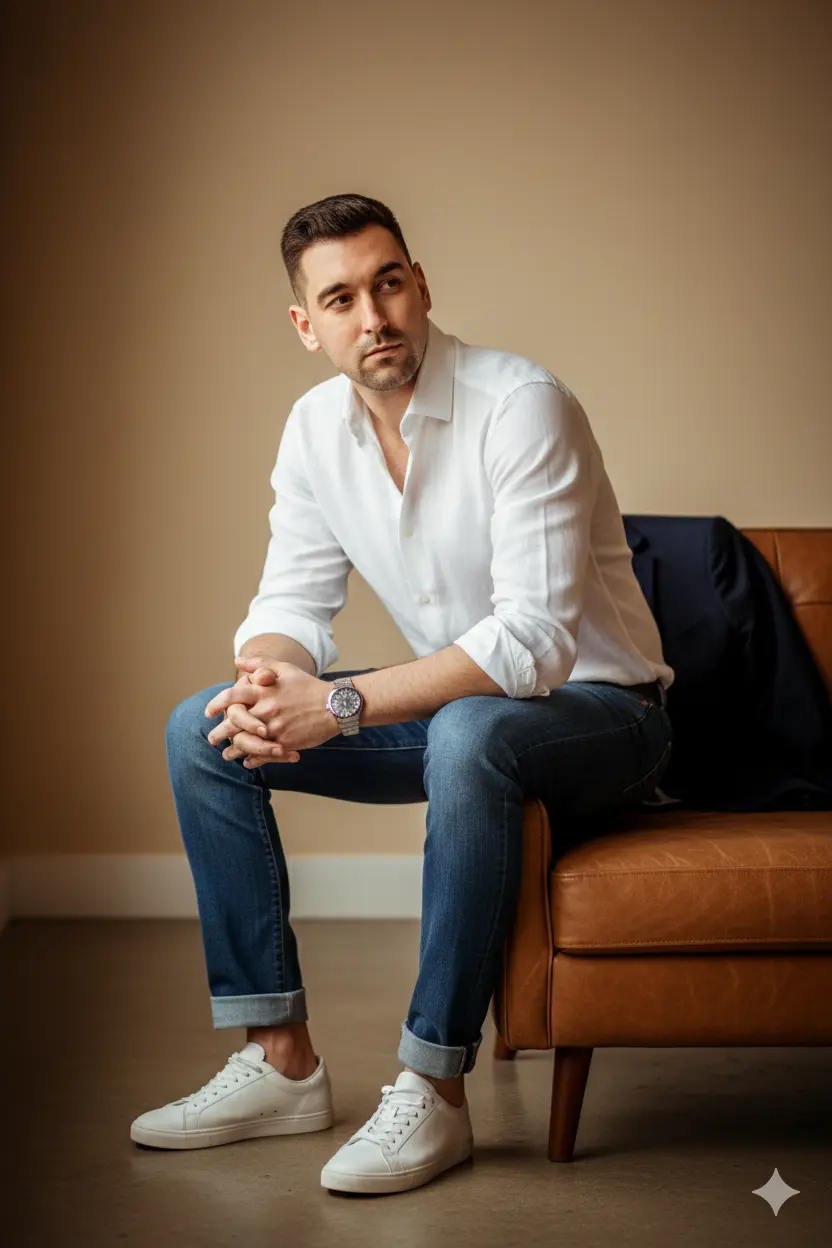
Casual Classic Nano Banana prompt example

Nano Banana prompt text

edit this image into a polished fashion editorial portrait — preserve the subject’s facial features and natural proportions. Keep the original pose and seating (sitting on the right arm of a mid-century brown leather sofa, leaning slightly forward, hands loosely clasped over the right knee, left foot flat, right ankle slightly raised). Outfit refinement: crisp white open-collar linen shirt with sleeves rolled to mid-forearm, slim straight indigo jeans cuffed at the ankle, clean white low-top leather sneakers; add a minimal silver watch on the left wrist. Lighting & mood: soft natural window light from camera-left, warm beige backdrop, gentle rim light to separate subject from background. Look & finish: high-end fashion / cinematic style, shallow depth of field (≈f/2.8), 50mm perspective, medium contrast, warm caramel/beige color grade, subtle film grain, realistic skin retouch (keep pores and texture), sharpen eyes, enhance fabric textures. Creative accents: slightly polish leather sofa, soft vignette, boost catchlights in the eyes, and add a lightweight navy blazer casually draped over the back of the sofa for composition balance. Output: full-body editorial crop (3:4), realistic finish, 300 dpi. Position: seated on sofa arm, leaning forward, hands resting on right knee, legs relaxed with right ankle raised.
FashionPhotographyRealisticPortrait

Prompt workflow

How to use this Nano Banana prompt

Start with the full prompt so its subject, scene, and visual direction stay connected. Then adapt only the part that changes your result: the subject for a new concept, the scene for a different setting, or the style and composition for a new format.

Preserve the core brief

Keep the subject, visual style, and composition cues that make this prompt recognizable. Change one creative variable at a time when iterating.

Match the output to the channel

Choose the aspect ratio for the final placement, then add a clear crop, camera, or layout instruction instead of relying on a vague style word.

Use references for hard-to-name details

Upload references when a product shape, material, palette, or composition is easier to show than to describe in words.

Refine with a specific goal

Ask for a concrete change such as a different background, lighting direction, framing, or text treatment while naming the details that must remain.

Use this prompt with other image models

This remains a Nano Banana prompt first. Use these alternatives when the same brief needs a different kind of image control.

Similar Nano Banana Prompts

Explore related visual directions selected from shared tags and popular prompt ideas.

Nano Banana prompt FAQ

How should I adapt this prompt?

Keep the strongest subject, scene, and style instructions, then make one targeted change for the result you need. Clear changes are easier to evaluate than replacing the whole prompt at once.

When should I use a reference image?

Use a reference when you need to preserve a visual detail that text alone may not capture, such as a product silhouette, a material, a color palette, or a composition.

Which model should I choose?

Start with Nano Banana for fast iteration. Choose GPT Image 2 for text-heavy or precise edit requests, and Flux 2 Pro when detailed commercial art direction or multiple references matter most.