Use code

for 30% off your first plan.

← Back to Nano Banana prompts

Nano Banana prompt

Canary Style Nano Banana Prompt

Published July 14, 2026 · ♥ 142

Canary Style Nano Banana prompt example

Nano Banana prompt text

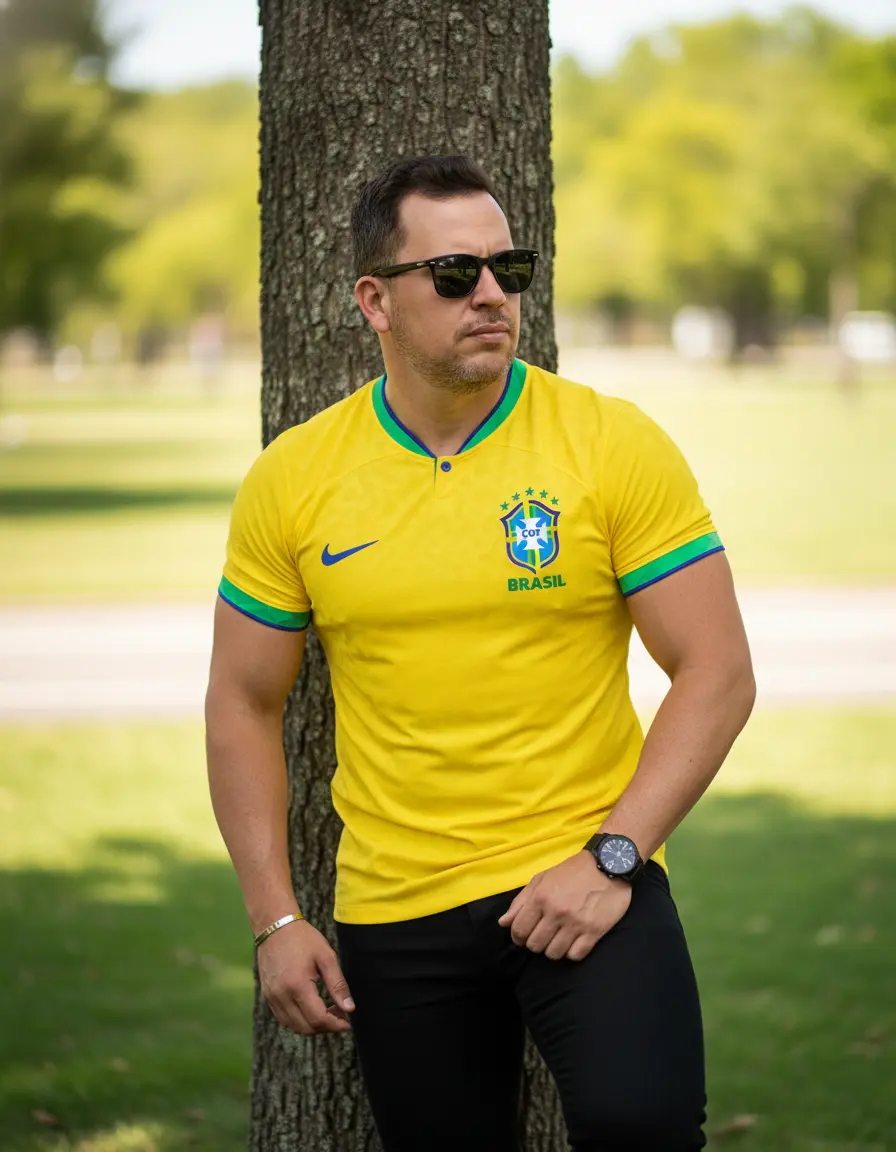
A medium-length portrait with a casual and stylish aesthetic, captured outdoors in a park setting. The male figure stands, leaning casually against a tree trunk, his body slightly turned and his gaze directed to the side through sunglasses. His expression is confident and relaxed. His muscular arms are prominent, with one hand resting on his thigh. He wears a Brazilian national soccer team jersey and black pants, which accentuate his physique. He also wears dark sunglasses, a wristwatch with a dark band, and a simple metal bracelet. The background is a park or green area with grass, next to a paved path, in bright sunlight. The background is softly blurred (bokeh). The lighting is natural and bright, typical of a sunny day, creating defined highlights and shadows that enhance the physique. Camera Settings: Captured with a prime portrait lens (e.g., 85mm f/1.8 or 50mm f/1.4) on a full-frame camera for flattering compression and creamy bokeh. Aperture set between f/2.8 and f/4.0 to isolate the subject from the background. ISO 100 for maximum image quality in bright sunlight. Fast shutter speed (e.g., 1/500s to 1/1000s) to compensate for the wide aperture. Natural and direct sunlight. Instructions for the "nano banana": "Please use the user's reference image to capture and apply all their features, keeping their face, hairstyle, beard, skin tone, and body image accurate and unchanged. The goal is to create a version of the user in this scenario. The clothing (Brazilian national soccer team jersey, black pants, sunglasses, watch), the pose leaning against the tree, the natural lighting, and the park background should be generated as described. The prompt does not describe hair or beard; use those in the reference photo entirely."
CinematicFashionPhotographyRealisticPortrait

Prompt workflow

How to use this Nano Banana prompt

Start with the full prompt so its subject, scene, and visual direction stay connected. Then adapt only the part that changes your result: the subject for a new concept, the scene for a different setting, or the style and composition for a new format.

Preserve the core brief

Keep the subject, visual style, and composition cues that make this prompt recognizable. Change one creative variable at a time when iterating.

Match the output to the channel

Choose the aspect ratio for the final placement, then add a clear crop, camera, or layout instruction instead of relying on a vague style word.

Use references for hard-to-name details

Upload references when a product shape, material, palette, or composition is easier to show than to describe in words.

Refine with a specific goal

Ask for a concrete change such as a different background, lighting direction, framing, or text treatment while naming the details that must remain.

Use this prompt with other image models

This remains a Nano Banana prompt first. Use these alternatives when the same brief needs a different kind of image control.

Similar Nano Banana Prompts

Explore related visual directions selected from shared tags and popular prompt ideas.

Nano Banana prompt FAQ

How should I adapt this prompt?

Keep the strongest subject, scene, and style instructions, then make one targeted change for the result you need. Clear changes are easier to evaluate than replacing the whole prompt at once.

When should I use a reference image?

Use a reference when you need to preserve a visual detail that text alone may not capture, such as a product silhouette, a material, a color palette, or a composition.

Which model should I choose?

Start with Nano Banana for fast iteration. Choose GPT Image 2 for text-heavy or precise edit requests, and Flux 2 Pro when detailed commercial art direction or multiple references matter most.