Use code

for 30% off your first plan.

← Back to Nano Banana prompts

Nano Banana prompt

Vintage Car Pro Nano Banana Prompt

Published July 14, 2026 · ♥ 439

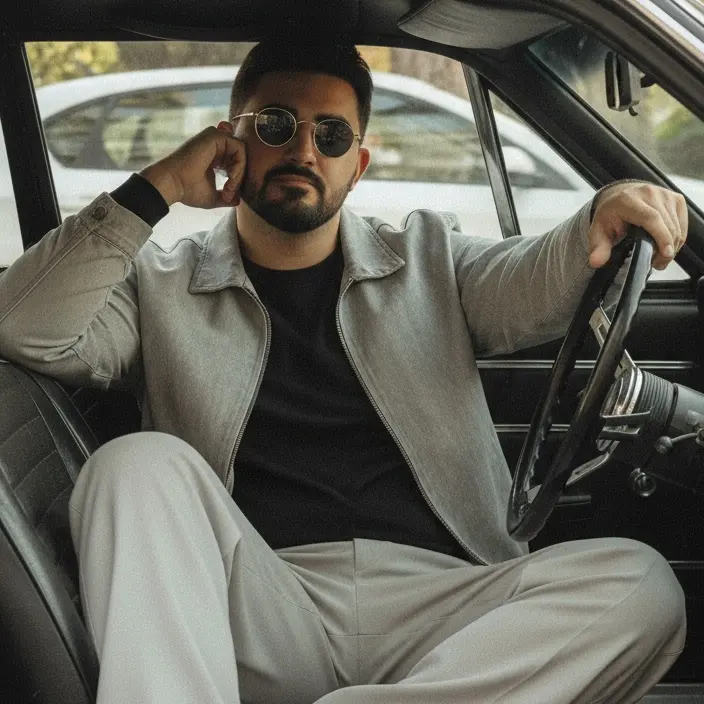
Vintage Car Pro Nano Banana prompt example

Nano Banana prompt text

Create a hyper-realistic portrait of a man (man of the uploaded photo) sitting in the driver's seat of a car, wearing a black shirt, combined with a faded light gray jacket and light gray wide-leg pants. White shoes should be visible, complementing the casual look. Round sunglasses with dark lenses should be positioned on the nose, highlighting a confident and slightly ironic facial expression. Relaxed posture: one arm on the sports steering wheel, the other supporting the head, conveying a relaxed look. The interior of the car should include side windows showing urban scenery (trees, buildings and part of another vehicle), and a black textured seat. Soft natural lighting, simulating daylight coming through the windows, creating a contrast between the warm colors of the clothing and the neutral environment of the car. Vintage style, with desaturated tones and slightly grainy textures, evoking a nostalgic atmosphere. Dominant tones of gray, white and black, with a balance between external light and internal shadows. Slightly elevated perspective, framing that includes the top of the knees to the head, with the steering wheel partially visible on the right.
CinematicFashion

Prompt workflow

How to use this Nano Banana prompt

Start with the full prompt so its subject, scene, and visual direction stay connected. Then adapt only the part that changes your result: the subject for a new concept, the scene for a different setting, or the style and composition for a new format.

Preserve the core brief

Keep the subject, visual style, and composition cues that make this prompt recognizable. Change one creative variable at a time when iterating.

Match the output to the channel

Choose the aspect ratio for the final placement, then add a clear crop, camera, or layout instruction instead of relying on a vague style word.

Use references for hard-to-name details

Upload references when a product shape, material, palette, or composition is easier to show than to describe in words.

Refine with a specific goal

Ask for a concrete change such as a different background, lighting direction, framing, or text treatment while naming the details that must remain.

Use this prompt with other image models

This remains a Nano Banana prompt first. Use these alternatives when the same brief needs a different kind of image control.

Similar Nano Banana Prompts

Explore related visual directions selected from shared tags and popular prompt ideas.

Nano Banana prompt FAQ

How should I adapt this prompt?

Keep the strongest subject, scene, and style instructions, then make one targeted change for the result you need. Clear changes are easier to evaluate than replacing the whole prompt at once.

When should I use a reference image?

Use a reference when you need to preserve a visual detail that text alone may not capture, such as a product silhouette, a material, a color palette, or a composition.

Which model should I choose?

Start with Nano Banana for fast iteration. Choose GPT Image 2 for text-heavy or precise edit requests, and Flux 2 Pro when detailed commercial art direction or multiple references matter most.

Nano Banana Prompt: Vintage Car Pro | PixPilot AI