Use code

for 30% off your first plan.

← Back to Nano Banana prompts

Nano Banana prompt

Storm Runway Nano Banana Prompt

Published July 14, 2026 · ♥ 43

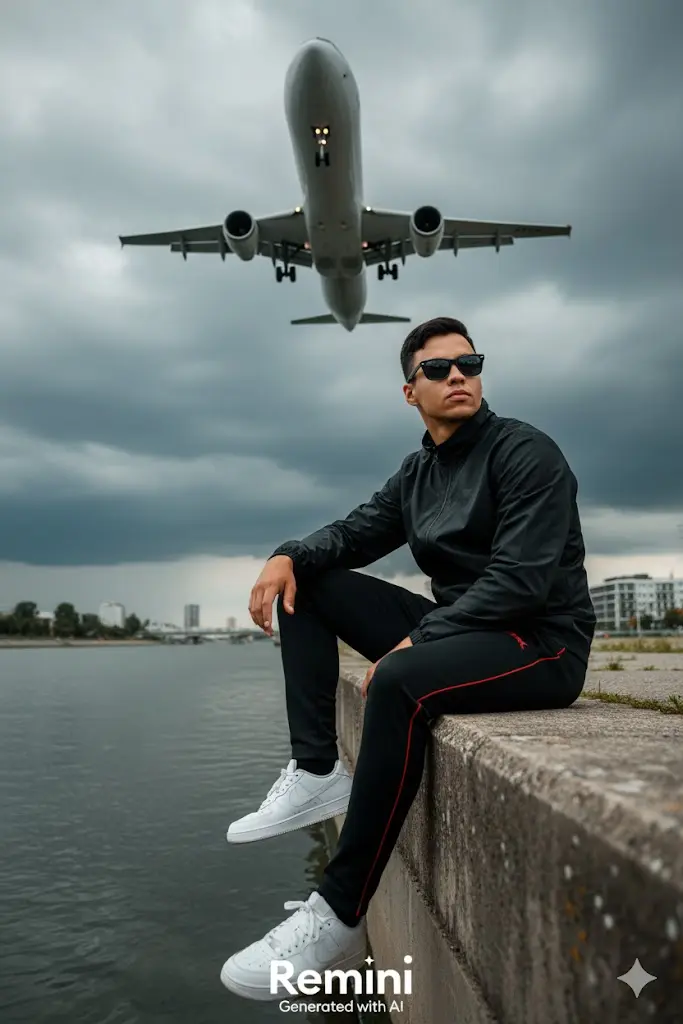
Storm Runway Nano Banana prompt example

Nano Banana prompt text

✈️🖤 Editorial Theme: “Storm Runway” 🎭 Concept A bold, cinematic portrait of a man seated calmly near a stormy airport runway as a massive airplane roars overhead. The contrast between the subject’s composed posture and the raw energy of the scene evokes themes of power, control, and urban solitude. The outfit — black jacket, striped pants, white sneakers, sunglasses — adds a streetwear edge to the dramatic setting. 🎥 Technical Specs Camera: Canon EOS R5 or Sony A7R IV Lens: 35mm f/1.4 for wide environmental framing with subject clarity Camera Angle: low angle or eye-level, emphasizing the scale of the plane and sky Aspect Ratio: 3:4 — perfect for vertical storytelling on Instagram or editorial layouts Resolution: Ultra HD (4K), with crisp detail in clothing, skin, and cloud texture Lighting: natural storm light with ambient overcast tones, enhancing contrast and mood Style: cinematic streetwear + urban surrealism 🤵 Three Key Poses Grounded Calm: seated like in the base image, legs relaxed, hands on knees, gaze forward — the plane overhead adds tension Runway Walk: standing on the embankment, walking slowly toward camera, plane in background, coat flowing Skyward Gaze: looking up as the plane passes, sunglasses catching light, expression unreadable — evoking mystery and scale 🌟 Visual Highlights Motion vs Stillness: airplane in motion, subject in calm — a visual metaphor for inner control Color Palette: dark clouds, muted concrete, black outfit with red accents, white sneakers — high contrast and editorial-ready Textures: concrete edge, fabric folds, cloud layers, metallic aircraft — all rendered in ultra detail Mood:
CinematicFashionPhotographyElegant

Prompt workflow

How to use this Nano Banana prompt

Start with the full prompt so its subject, scene, and visual direction stay connected. Then adapt only the part that changes your result: the subject for a new concept, the scene for a different setting, or the style and composition for a new format.

Preserve the core brief

Keep the subject, visual style, and composition cues that make this prompt recognizable. Change one creative variable at a time when iterating.

Match the output to the channel

Choose the aspect ratio for the final placement, then add a clear crop, camera, or layout instruction instead of relying on a vague style word.

Use references for hard-to-name details

Upload references when a product shape, material, palette, or composition is easier to show than to describe in words.

Refine with a specific goal

Ask for a concrete change such as a different background, lighting direction, framing, or text treatment while naming the details that must remain.

Use this prompt with other image models

This remains a Nano Banana prompt first. Use these alternatives when the same brief needs a different kind of image control.

Similar Nano Banana Prompts

Explore related visual directions selected from shared tags and popular prompt ideas.

Nano Banana prompt FAQ

How should I adapt this prompt?

Keep the strongest subject, scene, and style instructions, then make one targeted change for the result you need. Clear changes are easier to evaluate than replacing the whole prompt at once.

When should I use a reference image?

Use a reference when you need to preserve a visual detail that text alone may not capture, such as a product silhouette, a material, a color palette, or a composition.

Which model should I choose?

Start with Nano Banana for fast iteration. Choose GPT Image 2 for text-heavy or precise edit requests, and Flux 2 Pro when detailed commercial art direction or multiple references matter most.