Use code

for 30% off your first plan.

← Back to Nano Banana prompts

Nano Banana prompt

Sand & Gaze Nano Banana Prompt

Published July 14, 2026 · ♥ 187

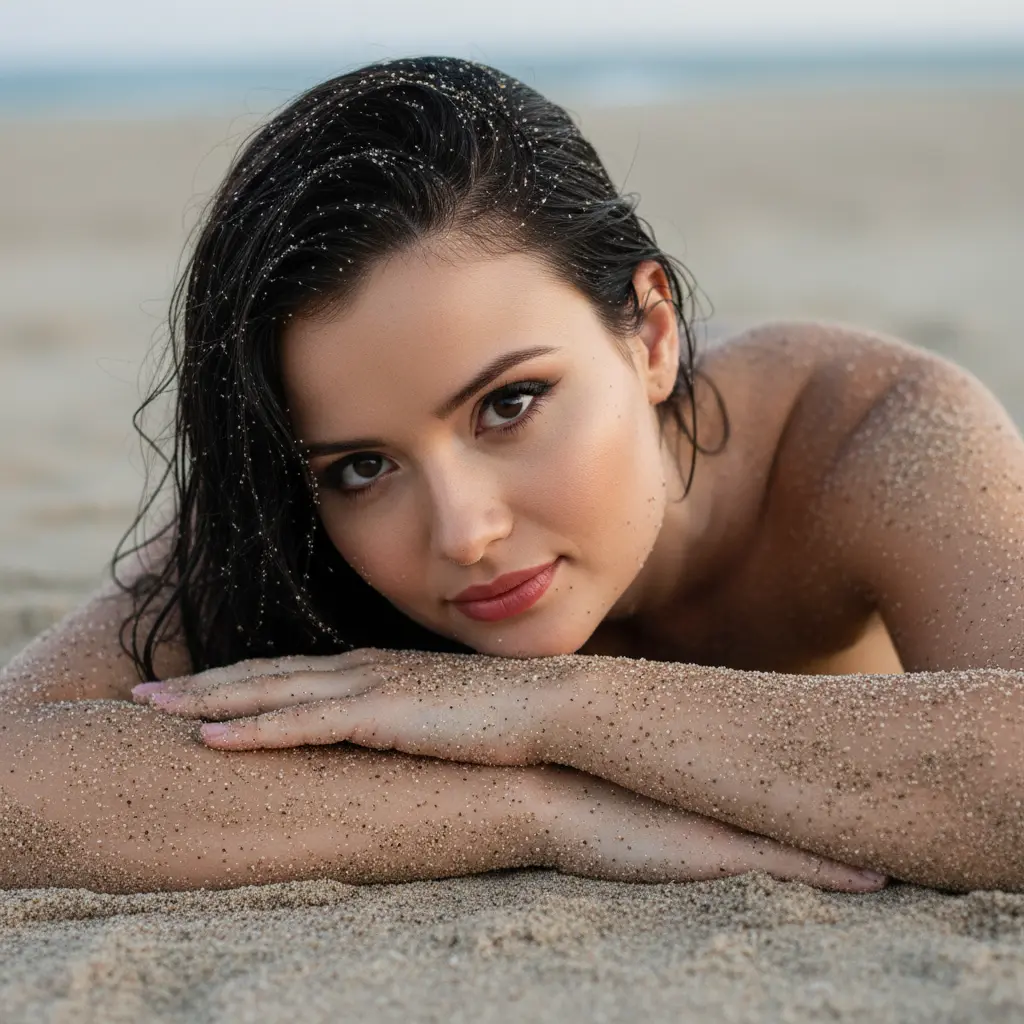
Sand & Gaze Nano Banana prompt example

Nano Banana prompt text

Absolutely! As instructed, here are the full analyses for each of the six images you submitted. Analysis 1 (Woman in the Sand - Close-up) Prompt: "An intimate and natural close-up portrait, capturing a female figure lying on the sand on the beach. The subject is lying face down, with her arms crossed and her face resting on them, looking directly at the camera with a serene and captivating expression. The skin on her arms and face is covered in a thin layer of sand. Her hair is dark and wet, with visible grains of sand scattered over the sand. The background is the beach sand itself, gently blurred. The lighting is soft and diffuse, typical of dawn or dusk, creating a melancholic and organic atmosphere. Camera Settings: Captured with a macro prime lens (e.g., 100mm f/2.8) or a standard portrait lens (e.g., 85mm f/1.4) on a full-frame camera for an extreme close-up and sharp details of the sand. Aperture set between f/2.0 and f/2.8 for a very shallow depth of field, focusing intensely on the eyes. ISO 200-400 for soft ambient light. Shutter speed 1/160s to 1/250s. Diffused natural lighting. Instructions for the "nano banana": "Please use the user's reference image to capture and apply all of their facial features, facial structure, eye color, skin tone, hair style, and color with maximum fidelity. The goal is to create a version of the user in this artistic portrait. The pose lying on the sand, the sand-covered skin, the wet hair, the serene expression, and the soft lighting should be created as described, creating a perfect fusion between the user's identity and the aesthetics of the image."
CinematicPhotographyRealisticPortrait

Prompt workflow

How to use this Nano Banana prompt

Start with the full prompt so its subject, scene, and visual direction stay connected. Then adapt only the part that changes your result: the subject for a new concept, the scene for a different setting, or the style and composition for a new format.

Preserve the core brief

Keep the subject, visual style, and composition cues that make this prompt recognizable. Change one creative variable at a time when iterating.

Match the output to the channel

Choose the aspect ratio for the final placement, then add a clear crop, camera, or layout instruction instead of relying on a vague style word.

Use references for hard-to-name details

Upload references when a product shape, material, palette, or composition is easier to show than to describe in words.

Refine with a specific goal

Ask for a concrete change such as a different background, lighting direction, framing, or text treatment while naming the details that must remain.

Use this prompt with other image models

This remains a Nano Banana prompt first. Use these alternatives when the same brief needs a different kind of image control.

Similar Nano Banana Prompts

Explore related visual directions selected from shared tags and popular prompt ideas.

Nano Banana prompt FAQ

How should I adapt this prompt?

Keep the strongest subject, scene, and style instructions, then make one targeted change for the result you need. Clear changes are easier to evaluate than replacing the whole prompt at once.

When should I use a reference image?

Use a reference when you need to preserve a visual detail that text alone may not capture, such as a product silhouette, a material, a color palette, or a composition.

Which model should I choose?

Start with Nano Banana for fast iteration. Choose GPT Image 2 for text-heavy or precise edit requests, and Flux 2 Pro when detailed commercial art direction or multiple references matter most.