Use code

for 30% off your first plan.

← Back to Nano Banana prompts

Nano Banana prompt

Golden Hour Hot Photoshot Nano Banana Prompt

Published July 14, 2026 · ♥ 139

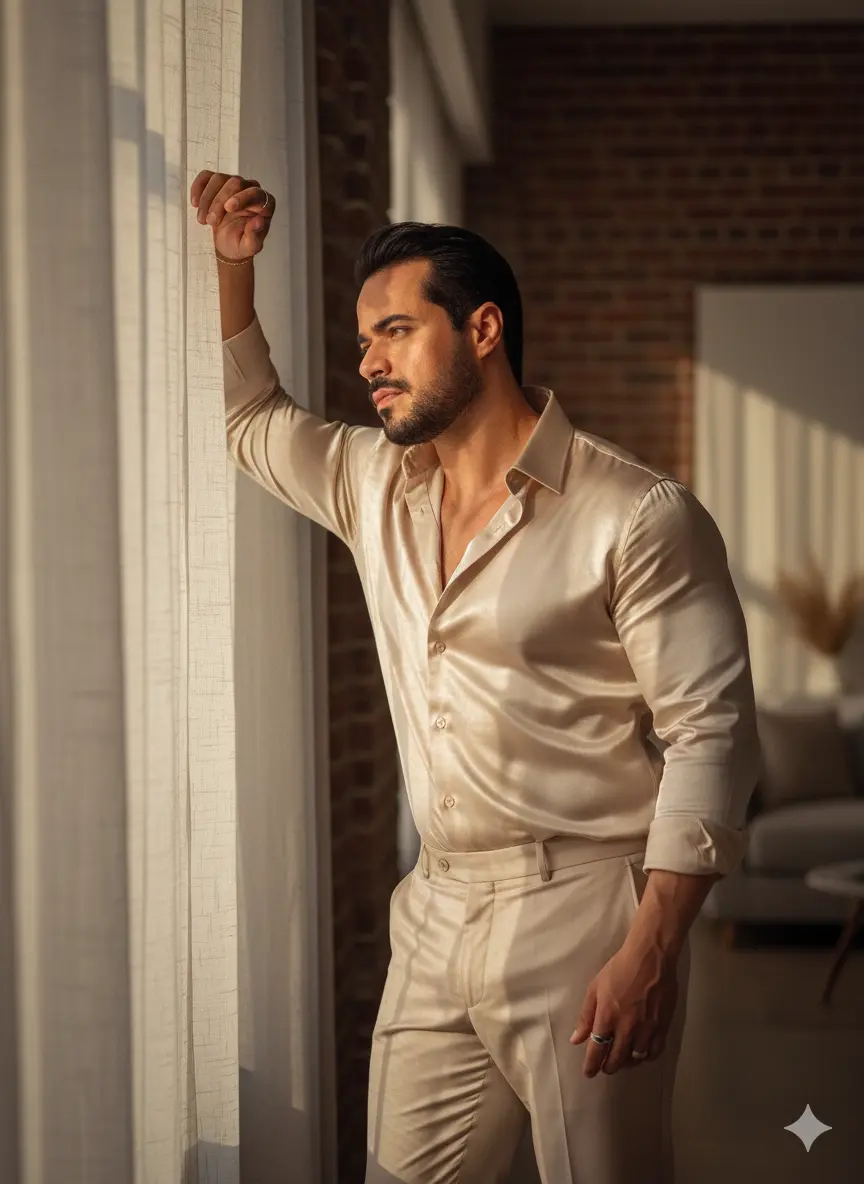
Golden Hour Hot Photoshot Nano Banana prompt example

Nano Banana prompt text

Shot on a Canon EOS R5 with an RF 85mm f/1.2L USM lens, A man stands leaning against a window. His right arm is bent, with his right forearm and hand resting on the upper frame or sill of the window, near his head. His head is tilted, and his face is turned in a partial profile to the left, looking out the window. His body is in a relaxed, slightly hunched forward posture, with his weight primarily supported on his right side, leaning towards the window. His left arm hangs naturally by his side. The pose conveys a sense of contemplation or weariness in a modern, sun-drenched loft apartment, poised in a captivating "Curtain Light Pose." Soft, diffused golden hour light streams dramatically through translucent sheer linen curtains, bathing her form in a painterly glow and creating a perfect, creamy bokeh that softens the background of exposed brick and minimalist decor. This exquisite light beautifully carves elegant, elongated shadows, while a precise, soft rectangular catchlight, perfectly mirroring the window's shape, gleams within his captivating eyes. His "Hot Mirror Selfie Outfit," a tailored, shimmering satin button-down dress shirt and tailored trousers both champange color, catches the light with a fluid, delicate sheen that highlights every contour, complementing hyper-realistic skin that showcases visible pores, completely devoid of any airbrushed artificiality. All rendered with the subtle grain and rich, warm tones reminiscent of Portra 800 film, creating an image of unparalleled editorial sophistication and high-fashion allure.. Use the attached image and maintain 100% face consistency.
CinematicFashionPhotographyModernRealisticElegantPortrait

Prompt workflow

How to use this Nano Banana prompt

Start with the full prompt so its subject, scene, and visual direction stay connected. Then adapt only the part that changes your result: the subject for a new concept, the scene for a different setting, or the style and composition for a new format.

Preserve the core brief

Keep the subject, visual style, and composition cues that make this prompt recognizable. Change one creative variable at a time when iterating.

Match the output to the channel

Choose the aspect ratio for the final placement, then add a clear crop, camera, or layout instruction instead of relying on a vague style word.

Use references for hard-to-name details

Upload references when a product shape, material, palette, or composition is easier to show than to describe in words.

Refine with a specific goal

Ask for a concrete change such as a different background, lighting direction, framing, or text treatment while naming the details that must remain.

Use this prompt with other image models

This remains a Nano Banana prompt first. Use these alternatives when the same brief needs a different kind of image control.

Similar Nano Banana Prompts

Explore related visual directions selected from shared tags and popular prompt ideas.

Nano Banana prompt FAQ

How should I adapt this prompt?

Keep the strongest subject, scene, and style instructions, then make one targeted change for the result you need. Clear changes are easier to evaluate than replacing the whole prompt at once.

When should I use a reference image?

Use a reference when you need to preserve a visual detail that text alone may not capture, such as a product silhouette, a material, a color palette, or a composition.

Which model should I choose?

Start with Nano Banana for fast iteration. Choose GPT Image 2 for text-heavy or precise edit requests, and Flux 2 Pro when detailed commercial art direction or multiple references matter most.